

March 2026 EZNews

Updated: Mar 1

Thank you for taking a few minutes to read the 59th edition of EZNews!

We appreciate those members who have opted for automatic monthly renewal of their EZWxBrief membership. At this time there are no options to renew your membership annually. If you haven't yet set up your account to renew automatically, please sign in and follow the prompts if your membership has expired. Otherwise, go to the User Profile page (see right) and tap or click on the Renew button on that page. This allows you to set up your monthly renewal using a Visa, MasterCard, or Discover credit card (we do not accept American Express at this time), ensuring you continue to enjoy the simplicity of EZWxBrief.
EZWxBrief adds convective potential bar to the app
Both the Airport Wx Meteogram and Route Profile have been updated to include a new Convective Potential bar. This is similar to the Flight Category bar located below the main viewport area. The new Convective Potential bar is positioned immediately below the predominant weather icon bar located above the main viewport area for both the Meteogram and Route Profile views and will appear on all views to include Winds, Clouds, Icing and Turbulence. Hovering over the bar with a mouse or tapping on the bar using a touch screen will display a convective potential tabular display listing the time, predominant forecast weather and the categorical convective potential. For the example below, 20Z on February 14th for this airport, there is a definite chance of heavy rain showers and numerous thunderstorms which equates to a "very high" convective potential.
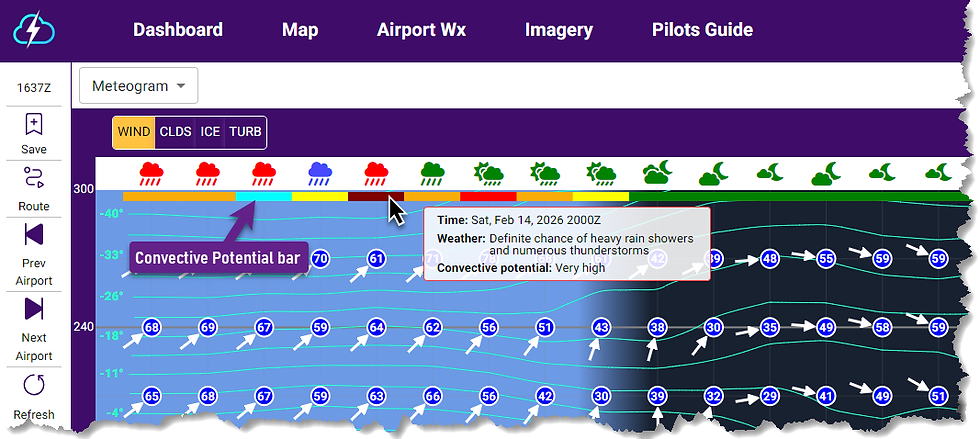

The convective potential is the same used for the En Route Convective Potential found in the Personal Minimums settings under the gear/settings icon. The values None, Very low, Low, Moderate, High and Very High are used by the EZDeparture Advisor to evaluate the en route convective risk along the active route of flight. The colors used for each convective potential category are shown below.

Ad mentioned above, the same Convective Potential bar will appear on the Route Profile in a similar location to depict a continuous high-resolution risk of deep, moist convection and thunderstorms along the active route of flight. Hovering over or tapping on the bar will provide a tabular display that includes the time, predominant forecast weather and the convective potential category.

EZWxBrief adds translation of METARs into plain English
Are you not a fan of coded surface observations or METARs? Well, now in the Airport Wx view under the METARs selection you will have the option of having those coded surface observations translated into plain English (with the exception of the remarks). For a bit more background on why surface observations were coded in the first place, read this post (and it's not likely what you think!).
After choosing a specific airport from the Dashboard, Map, Route Profile, Saved Items or Recent Airport list, you will find a site map dropdown menu that includes a METARs option.
The result will default to a list of all coded surface observations available in the last 12 hours for the selected airport. If the airport has one or more coded METARs, you will see a switch to Translate these coded surface observations into plain English.

When you move the switch toward "Translate" (as shown below), a tabular display for the basic elements of the surface observation will be listed below each coded observation. Simply scroll the window down using your mouse or finger on portable devices to see the translations for older observations for the selected airport.


Convectively-induced turbulence
It's getting to that time of year where we start seeing more and more convection popping up all over the U.S. The good news is that EZWxBrief now has convectively-induced turbulence as part of the turbulence Meteogram and Route Profile views. Selecting the CAT/CIT will combine clear air turbulence (CAT) and convective-induced turbulence (CIT)

Here's a good example. Take note of the line of convection moving through the Deep South. This is the EZWxBrief forecast radar shown on the Map. Certainly this alone looks very ominous and most pilots proposing a route from New Orleans (KMSY) to Lake Charles (LCH) on this day would definitely assume you may encounter severe and possibly extreme turbulence flying through a line with this level of forecast intensity.
Sure enough, looking at the route profile view in EZWxBrief shows a distinct area of severe turbulence (red) from near the surface to 45,000 feet if flown through this line. In fact, at 15,000 feet, the convectively-induced turbulence is expected to have an Eddy Dissipation Rate (EDR) value of 67 which for light aircraft is in the extreme turbulence category (extreme begins at 64).
New TAF service begins for Aiken Regional Airport (KAIK)
Effective April 6, 2026, at 1200Z, the NWS office in Columbia, SC, will begin TAF service for the Aiken Regional Airport (KAIK) in Aiken, South Carolina.
EZWxBrief v2 News
EZWxBrief v2.1.1 and v2.2.0 were released in February. This includes a new and improved forecast for airframe icing used in the app. The release notes can be found here. If the app is open, sign out and close the app. Upon restart, you will have immediate access to the latest release.
Most pilots are weatherwise, but some are otherwise™
Your EZWxBrief product and sales team


Comments